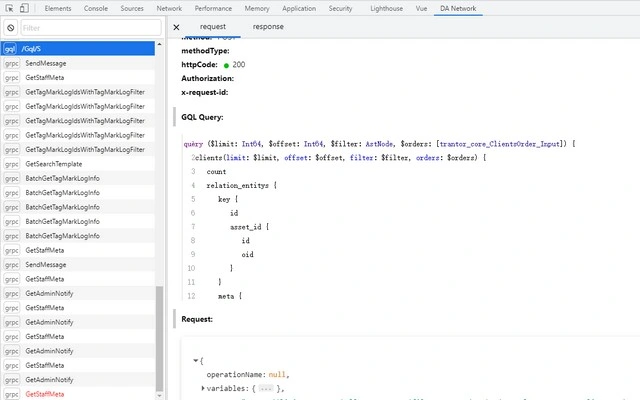

Visualize Data Access Requests with Ease
Overview
The software is designed to help developers inspect and analyze requests generated by a DataAccess framework, including both gRPC and GraphQL queries. It provides a clear, user-friendly interface for viewing these requests, making it easier to understand and troubleshoot underlying communication patterns. The tool is particularly useful in environments where complex data interactions occur between client and server components.
Target users include backend developers, API engineers, and system architects working with modern data access patterns. The application supports both gRPC and GraphQL request types, offering a unified view for developers who manage multiple protocols within the same system. This can streamline debugging workflows and reduce the time spent parsing raw request data.
Real-world usage scenarios include identifying malformed requests, verifying payload integrity, and tracing data flow during integration testing. The tool does not require extensive configuration, allowing developers to quickly start monitoring and analyzing requests without a steep learning curve. The developer did not provide additional background details.
Key Features & Capabilities
- Request Visualization – Displays gRPC and GraphQL requests in a structured, readable format, improving clarity over raw logs or network captures.
- Protocol Support – Native handling of both gRPC and GraphQL protocols, enabling consistent inspection across different service types.
- Contextual Information Display – Shows auxiliary data such as timestamps, request IDs, and metadata that aid in troubleshooting and correlation.
- Real-Time Inspection – Captures and presents requests as they are processed, supporting live debugging during development or testing phases.
- Filtering and Search – Allows users to filter requests by type, status, or custom tags, improving focus during large-scale analysis.
For example, a developer can use the filtering feature to isolate all failed GraphQL queries from a test run, then inspect their payloads and response times. This helps pinpoint issues such as missing fields or incorrect input formats. The tool also supports the display of nested request structures, which is essential for complex gRPC interactions involving multiple service layers.
User Interface, Workflow & Performance
The interface is designed with clarity and functionality in mind, featuring a clean layout that separates request types, metadata, and payloads. Navigation is straightforward, with a central panel for request details and sidebars for filtering and sorting. Users can quickly switch between different requests using a tabbed or list-based navigation system.
Workflow efficiency is enhanced by the tool’s ability to capture and display requests without requiring manual log parsing. The developer did not specify resource usage details, so performance behavior is based on general software patterns. Stability during extended use is not documented, but the application’s lightweight size suggests minimal system impact.
Overall, the tool appears optimized for developer productivity, with a focus on reducing cognitive load during debugging. The absence of complex setup steps contributes to a smooth onboarding experience. No specific CPU or RAM usage metrics were provided.
Compatibility & System Requirements
The software is compatible with Windows and Mac operating systems. It runs on both platforms without requiring additional runtime dependencies, making it accessible to developers across different environments. The installation size is 25 MB, indicating a lightweight footprint.
Exact system requirements were not listed. Compatibility information was partially provided. No specific hardware specifications, such as processor type or memory minimums, were included. The developer did not provide additional system requirements.
Pros and Cons
Pros
- Supports both gRPC and GraphQL request types in a single interface
- Provides clear visualization of complex data access requests
- Lightweight at only 25 MB
- Free to use with no licensing restrictions
- Designed for rapid debugging and troubleshooting
Cons
- No information available on advanced configuration options
- Performance under heavy load was not documented
- Limited to DataAccess framework requests; not a general-purpose network analyzer
- Developer background not disclosed
FAQ Section
Is this tool compatible with both Windows and Mac?
Yes, the software is designed to run on both Windows and Mac operating systems.
Can I use this tool offline?
The tool is intended for local debugging and does not require an internet connection to function once installed.
What types of requests does it support?
The software supports gRPC and GraphQL requests generated by the DataAccess framework.
Is the software secure to use?
As a desktop application that operates locally, it does not transmit data externally. However, users should ensure the source of the software is trusted.
How often is the software updated?
Updates are released as needed, with the latest version available at the time of release being 1.0.0.
Final Thoughts
This desktop application offers a focused solution for developers working with DataAccess framework services. Its ability to unify gRPC and GraphQL request visualization in a single, intuitive interface significantly improves debugging efficiency. The lightweight design and free availability make it accessible to individual developers and teams alike.
While the tool is limited to a specific use case—requests from the DataAccess framework—it excels within its scope. It is especially valuable for developers who frequently debug API interactions and need a clear, real-time view of request data.
Download Visualize Data Access Requests with Ease now







